An encrypted notebook and a whole lot more
Bouquin is a Python/Qt notebook that treats each day as a page, encrypts everything with SQLCipher, versions every change, and - unusually for a notepad - can track time and invoice for it. Features are modular and toggleable.
You didn't write yet another notebook app, did you Mig?
For a very long time, I've subscribed to Tom Limoncelli's approach to time management, whereby each day is effectively a checklist of TODO items. As best as I can, I try to diligently proceed in the order of the TODOs, roughly prioritised (ignoring the heavy context-switching that is involved in between a contract sysadmin dealing with reactive work).
Whatever doesn't get ticked off the list at the end of the day, moves to the top of tomorrow's list, and like so, things eventually get done (ha ha, oh the earnestness of this statement...).
For a long time, my 'TODO list' app has simply been Red Notebook. Simple, date-based, effective.
Frustratingly, the Debian version lagged behind some neat features for a long time. Then upon Debian 13, it caught up on a lot of them, but also added a bunch of new bugs that didn't exist in the earlier versions, too. I finally had enough...
Most notebook apps fall into one of two camps. There's the cloud-synced, collaborative, everything-lives-on-someone-else's-server camp - convenient, but your notes leave your machine and you trust a vendor with them. And there's the plain-text-files-in-a-folder camp - yours, forever, but with no structure, no versioning, and no concept of time.
I wanted neither. I wanted a notebook that lives on one machine, encrypts itself on disk, treats each day as its own page, and remembers every edit I ever made to it.
SQLCipher, not SQLite
The database is SQLCipher , not stock SQLite.
SQLCipher is a drop-in replacement for SQLite that adds transparent, AES-256 encryption at the
file level. The database is encrypted on disk; the key never touches storage unless you
explicitly tell it to. From the application's point of view, nothing changes - you open the
database, send PRAGMA key, and read and write rows as normal. The encryption is invisible to
the code above it.
Bouquin depends on a packaged bouquin-sqlcipher4 wheel rather than relying on whatever
SQLite the system happens to ship, so the encrypted-at-rest guarantee is real and not dependent
on your distro's choices. The key is requested when the app opens and is held in memory only.
Saving the key to the settings file is possible, but it is opt-in and off by default - the
safer path is being prompted each time.
A few consequences fall out of this that matter to me, even if they sound mundane:
- The notebook database is a single file you can back up, copy, or move - and it's ciphertext without the key.
- You can rekey the database (change the password) from inside the app.
- You can back up to another encrypted SQLCipher database, or export to plaintext JSON, HTML,
CSV, Markdown, or
.sqlfor stock sqlite3. The export is deliberate and user-initiated; the at-rest state is always encrypted.
There is deliberately no network connectivity. No syncing, no cloud, no telemetry. The only outbound calls are an optional in-app bug report and an optional check for new versions. If you don't want either, they stay off. The notebook is yours and stays on the machine.
Every day is a page, every edit is versioned
My big inspiration for the core functionality was that of Red Notebook. Each date is its own page.
You navigate with a calendar widget, or jump to today, or right-click a date to open it in a new tab. Tabs are first-class - you can have several dates open at once, ordered by date.
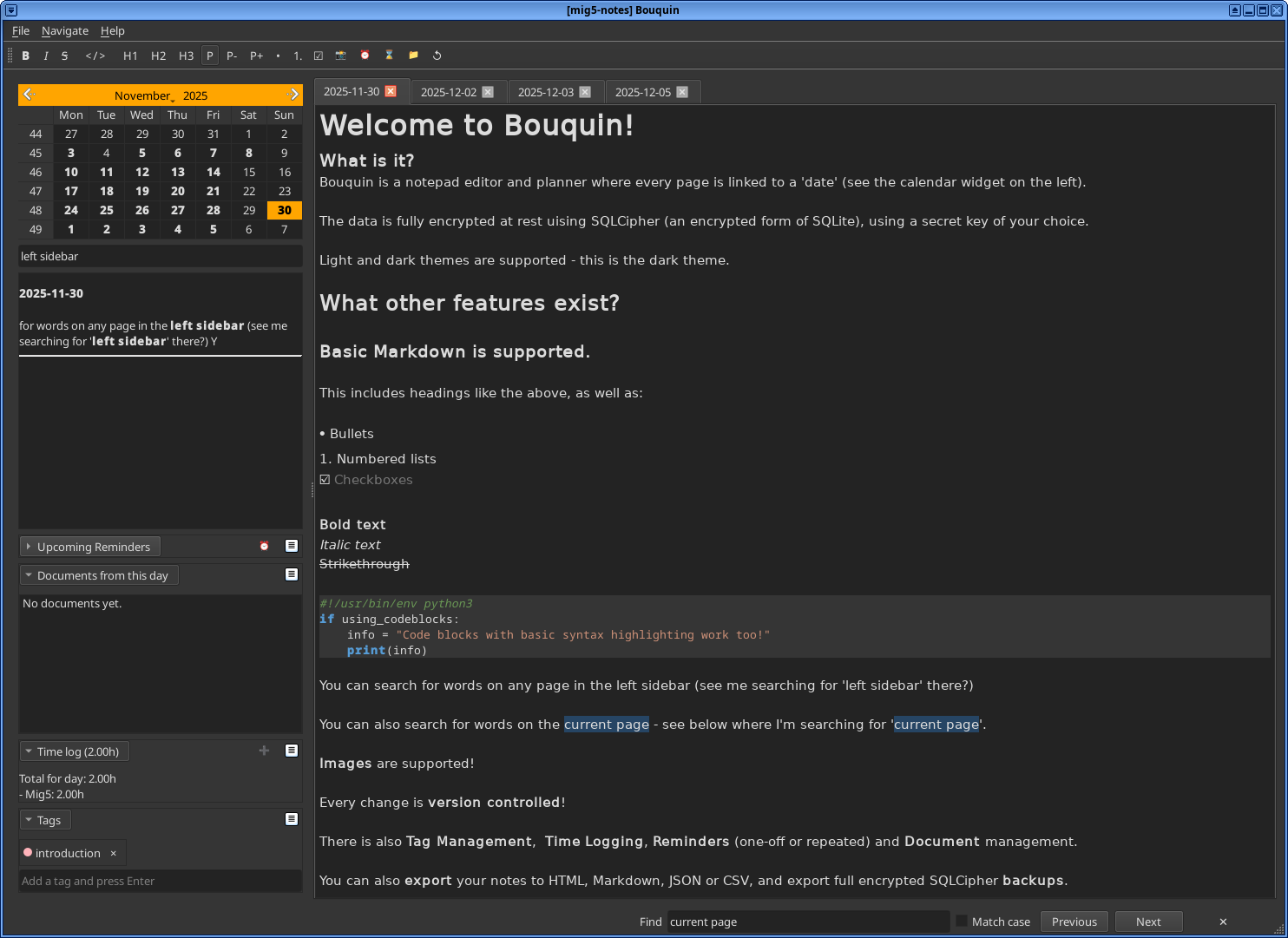
The editor is Markdown, rendered live as you type, with a toolbar for the styles you'd expect.
Code blocks get their own dialog with syntax highlighting. Sections of text can be collapsed and
expanded. Images are supported. Typing TODO at the start of a line auto-converts to a
checkbox, and there's an option to carry unchecked TODOs from the last seven days forward to the
next weekday - so yesterday's unfinished tasks don't silently disappear.
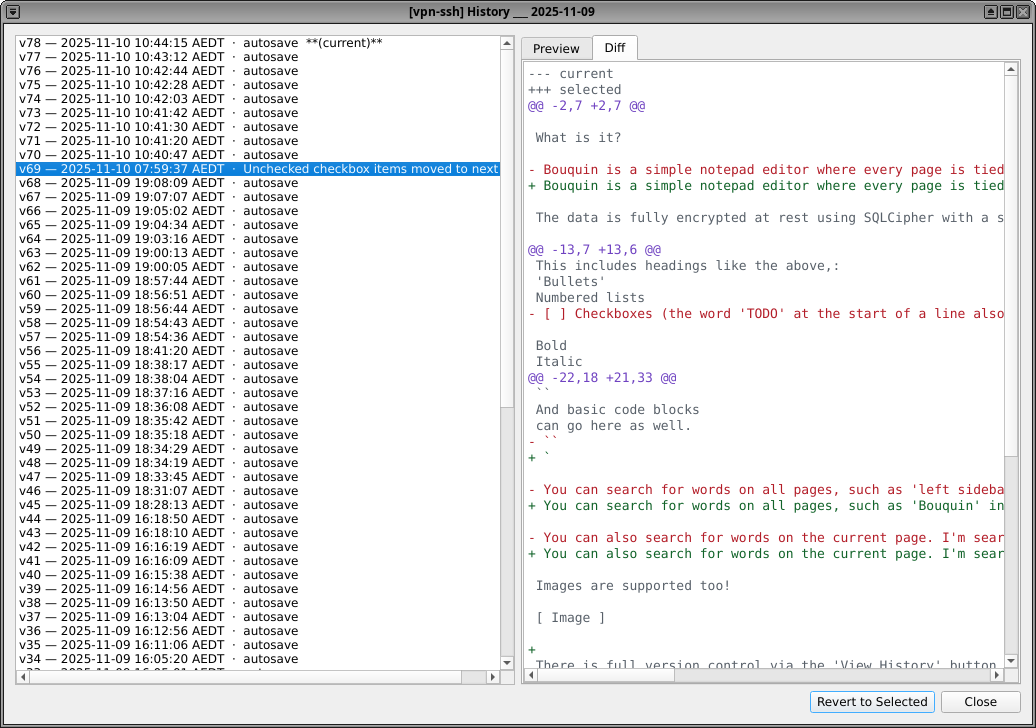
The feature I lean on most is version control. Every save creates a revision (and it also auto-saves).
A History dialog lists every version of a page, previews the content, and shows a diff between any two revisions.
You can revert to a previous version without losing the newer ones - revert is additive, not
destructive - and you can delete revisions you don't need. For a notebook, this is surprisingly
liberating. You can delete a paragraph you're unsure about, knowing it's recoverable. You can
see what a page looked like three weeks ago. It's git for your own notes, local and private.
Tags, search, and statistics
Tags can be applied to pages and documents, and browsed through a tag manager. Search runs across all pages, or just the current one via a find bar. The calendar itself highlights dates with search matches.
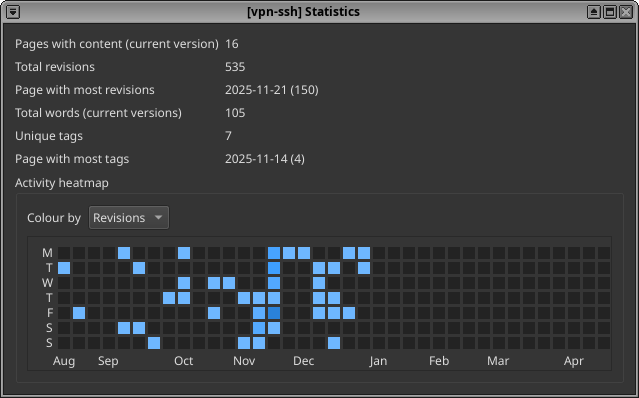
There's a statistics view with a heatmap of activity, clickable dates that jump straight to the page, and - when the time logging feature is on - breakdowns of logged time. It's a useful way to see at a glance which days you actually worked and which you didn't.
The modular feature model
After a period of time using Bouquin as my daily driver, it grew beyond merely 'TODO lists' and scratchpads of notes. It truly began to become my personal 'lone contract sysadmin' project management tool.
At the time, I was also self-hosting a crusty old Redmine instance whereby I would log my time against different 'client' project tickets. The clients themselves didn't use my Redmine: they have their own project management tools. My Redmine was just a bloaty time-tracking system.
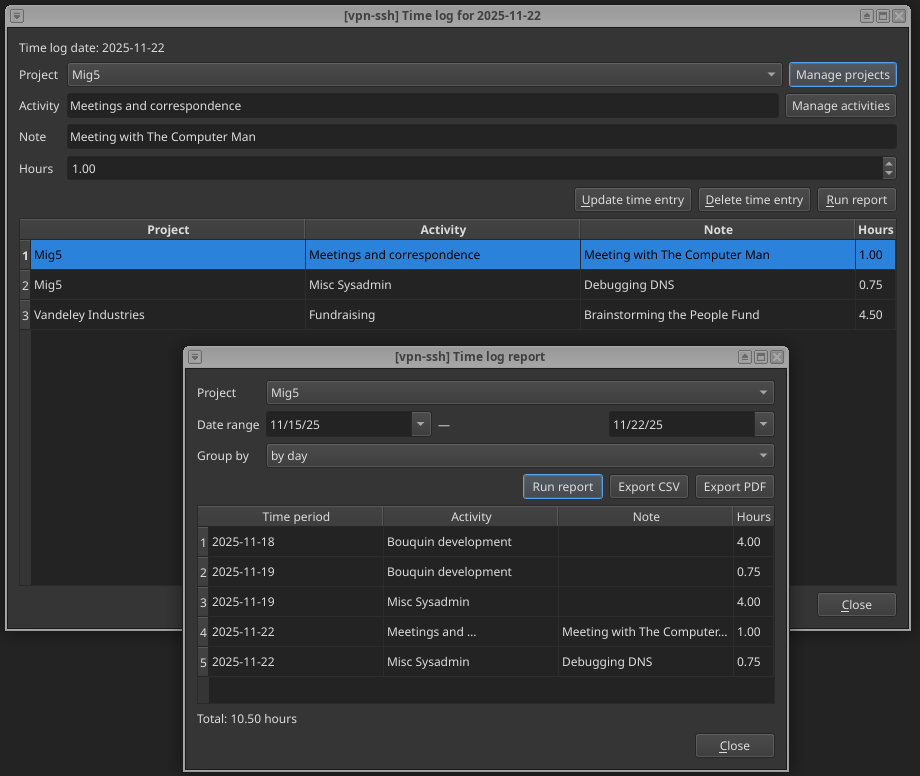
So, I eventually added a Pomodoro timer widget into Bouquin to track time against a specific 'TODO' item on the page. I was soon logging my time per client (which also meant introducing a 'projects' and 'activities' concept to Bouquin, structurally) all in the one app. Goodbye, old Redmine instance! I don't need you anymore.
At the end of the month, my previous pattern was essentially, per client:
- Get the total hours worked, out of Redmine
- Get an export with a breakdown based on activity, out of Redmine
- Create an invoice in Paypal (just because it has a handy free invoicing feature - you don't need to send it via Paypal)
- Send the PDF invoice and timesheet to the client
All the data I needed was in Bouquin. Given it now had a concept of 'client', I realised that I could also add a basic invoicing module into it which let me generate the invoices directly from the data.
With my 'reminders' feature, I also realised I could automatically program in the due date of the invoice, and have it remind me if a client hasn't paid, come that day.
What ties it together is the Projects interface, added in 0.9.0. A Project is a single bucket that unifies time logged, invoices, and documents. You can set a prepaid "bucket" of hours against a project and get warned when logged time approaches it - useful for fixed-scope contracts. You can invoice for an increase in prepaid hours without having to fake time entries for them. And documents stored against a project sit alongside the time and the invoices, all in one view.
The most recent release added an Earnings view for tracking income across reporting periods - the kind of thing you need when putting together a tax-period summary. It's a small addition, but it's the logical end of the thread that started with "let me log how long I worked today".
Documents, embedded and encrypted
Finally, I am in the position where I can do all my project planning, note taking, time logging, and invoicing, all from the one application!
Modular life
Importantly, I've made it modular. Not everyone wants invoicing in their notebook. Not everyone wants time logging. Some people just want an encrypted journal.
So the heavier features are modular and toggleable in Settings:
- Tags - on by default, but can be switched off.
- Time logging - on by default, but optional.
- Invoicing - off by default, and only available if time logging is on. It depends on it.
- Reminders - optional, with webhook and email notification support.
- Documents - optional file storage, embedded in the encrypted database.
When you toggle a feature off, its UI disappears. The settings dialog enforces the dependency: disable time logging and invoicing goes with it.
The Documents feature stores files - PDFs, images, whatever - inside the encrypted database, tied to Projects the same way time and invoices are. They're not links to files on disk; they're embedded, which means they're encrypted along with everything else and travel with the database when you back it up. Tags apply to documents too.
If the Documents feature is enabled, and so is Invoicing, then Invoicing also saves the invoice as a Document!
This is one of the quiet benefits of the SQLCipher backend: binary blobs in the database are ciphertext on disk, just like the text. There's no separate "attachments folder" sitting unencrypted next to the notebook.
Reminders that can reach you
Reminders can be one-off or recurring - daily, weekly, fortnightly, monthly on the Nth weekday.
When they fire, they flash in-app. But they can also be sent as webhooks or email notifications,
which means a reminder can reach you even when Bouquin isn't open. A URL and a secret (sent as an
X-Bouquin-Secret header) are configured in Settings, and the reminder fires to that endpoint. Wire it
into Node-RED
or any webhook receiver and your notebook can ping
your phone.
Where to find it
Bouquin is packaged for Debian and Fedora from my own APT and RPM repositories, available as an
AppImage, on PyPI (pip install bouquin), and from source. The source and full changelog are at
git.mig5.net/mig5/bouquin
, with more on the
project page
.
- Language: Python, Qt (PySide6)
- Backend: SQLCipher (encrypted at rest)
- Distribution: APT, RPM, AppImage, PyPI